Voice & Greeting
Each project in the Chakra Console can be configured with a specific Agent Voice and Call Greeting. These settings control how callers experience the voice and opening seconds of every conversation.
Agent Voice
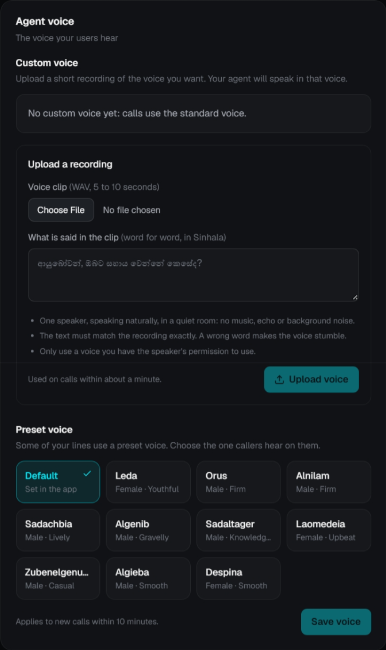
The Agent Voice setting determines how your conversational AI sounds. You can either upload a Custom Voice clone or select a Preset Voice from the curated voice library.
Custom Voice Cloning
Upload a short reference audio recording of the voice you want your agent to speak in.
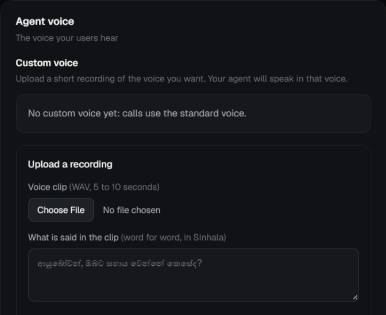
- Under Upload a recording, click Choose File and select your voice clip.
- Audio format: WAV format, 5 to 10 seconds long.
- Acoustic conditions: Exactly one speaker, speaking naturally in a quiet room with no background music, echo, or ambient noise.
- Consent: Only use a voice for which you have the speaker's explicit permission.
- Enter the transcript in the What is said in the clip box.
- Enter the transcript word-for-word in the spoken language (e.g., Sinhala:
ආයුබෝවන්, ඔබට සහය වෙන්නේ කෙසේද?). - The text must match the recording exactly — a wrong or missing word makes the voice stumble.
- Enter the transcript word-for-word in the spoken language (e.g., Sinhala:
- Click Upload voice.
The voice is deployed and used on new calls within about a minute. You can return to the standard voice at any time.
Preset Voice
If your lines use a preset voice, you can choose from the built-in library of expressive character voices:
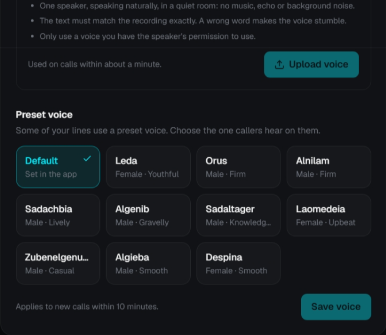
| Voice Name | Gender & Tone Profile |
|---|---|
| Default | Set in the application configuration |
| Leda | Female · Youthful |
| Orus | Male · Firm |
| Alnilam | Male · Firm |
| Sadachbia | Male · Lively |
| Algenib | Male · Gravelly |
| Sadaltager | Male · Knowledgeable |
| Laomedeia | Female · Upbeat |
| Zubenelgenubi | Male · Casual |
| Algieba | Male · Smooth |
| Despina | Female · Smooth |
To change the voice:
- Click on the desired voice card to highlight it.
- Click Save voice.
Changes apply to new calls within 10 minutes.
Call Greeting
The Greeting controls what callers hear the moment a call or session connects.
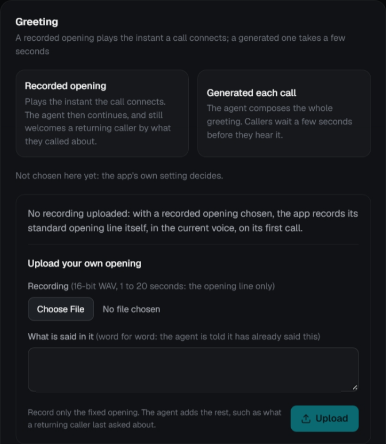
Greeting Modes
| Mode | What happens |
|---|---|
| Recorded opening | Plays the instant the call connects with zero latency. The agent then continues smoothly, and welcomes a returning caller by what they previously called about. |
| Generated each call | The agent composes the whole greeting dynamically based on its prompt. Callers wait a few seconds before hearing the agent speak. |
Automatic initial recording
If Recorded opening is chosen but no custom recording has been uploaded, the app automatically records its standard opening line itself, in the current voice, on its first call.
Uploading Your Own Opening
You can upload a custom branded audio clip to play as the opening greeting:
- Under Upload your own opening, click Choose File.
- Format: 16-bit WAV, 1 to 20 seconds.
- Scope: Record the fixed opening line only (e.g., brand welcome). The AI agent automatically appends the dynamic context, such as recognizing returning callers.
- In What is said in it, enter the verbatim text (e.g.,
ආයුබෝවන්! ගොවි මිතුරු වෙත ඔබව සාදරයෙන් පිළිගන්නවා.).- The agent is informed that it has already spoken this line so it does not repeat it.
- Click Upload.
Good to Know
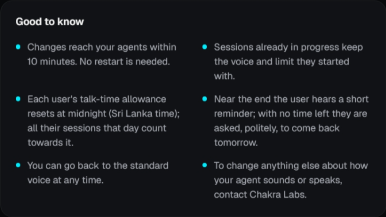
- Fast Synchronization: Changes reach your agents within 10 minutes. No server or container restart is needed.
- Active Call Safety: Sessions already in progress keep the voice and limit they started with to prevent mid-call disruption.
- Midnight Reset: Each user's talk-time allowance resets at midnight (Sri Lanka time); all their sessions that day count towards it.
- Caller Reminders: Near the end of their allowance, the caller hears a short reminder prompt. When no time remains, they are asked, politely, to call back tomorrow.
- Revert Anytime: You can return to the standard voice at any time.
- Specialized Voice Customizations: To change anything else about how your agent sounds or speaks (e.g. speed, inflection, vocabulary), contact the Chakra Labs team.